
Month-End Bulk E-Invoice Generation Without Missing the 30-Day Limit
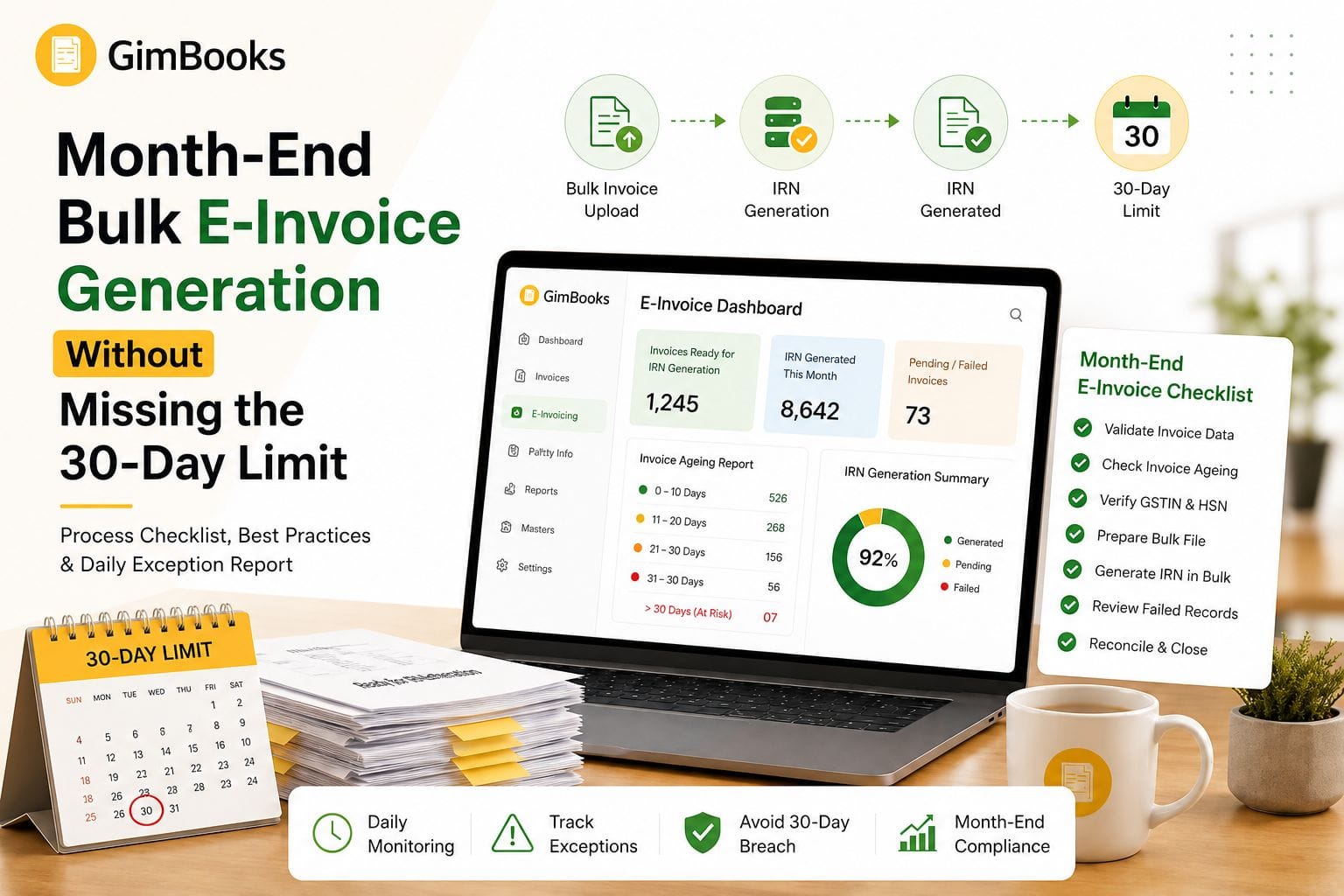
Bulk e invoice generation helps high-volume businesses create multiple Invoice Reference Numbers without processing every invoice manually. For wholesalers, distributors, manufacturers and large trading businesses, this is useful during busy billing cycles and month-end closing.
However, bulk generation also creates a compliance risk.
If the finance team waits until the end of the month to upload all invoices, some documents may already be close to the 30-day reporting limit. For taxpayers with Annual Aggregate Turnover of ₹10 crore or more, eligible e-invoice documents must be reported to the Invoice Registration Portal within 30 days from the document date.
Once the reporting window expires, the IRP does not allow IRN generation for that document.
This means month-end bulk e-invoice generation should not be treated as a last-day activity. Businesses need a daily exception report, invoice-ageing controls and a clear process for correcting failed IRN requests before the 30-day limit is crossed.
This guide explains how to manage bulk IRN generation safely without missing the 30-day e-invoice reporting rule.
Key Takeaways
- Bulk e-invoice generation allows businesses to generate IRNs for multiple invoices together.
- Businesses with AATO of ₹10 crore or more must report eligible invoices, credit notes and debit notes within 30 days from the document date.
- Month-end bulk upload is risky if old invoices are included without ageing checks.
- A document dated 1 April must be reported on or before 30 April.
- The IRP rejects documents reported after the permitted 30-day window.
- The safest process is daily or near-daily IRN generation, not monthly backlog upload.
- Finance teams should maintain a pending-IRN report with ageing buckets.
- Failed invoices should be corrected within 24 hours, not left for month-end.
- Bulk files should be validated before upload to reduce IRP rejection.
- GimBooks can support e-invoicing, invoice reports and e-way bill workflows for businesses managing high-volume billing.
What Is Bulk E-Invoice Generation?
Bulk e-invoice generation is the process of generating IRNs for multiple invoices, credit notes or debit notes in a single workflow.
Instead of entering each invoice separately on the portal, businesses can use:
- an Excel-based offline tool;
- bulk JSON upload;
- API-based integration;
- billing software with bulk e-invoice capability;
- ERP or GST Suvidha Provider integration.
The official NIC e-invoice portal provides bulk generation tools and a bulk e-invoice generation user manual for taxpayers who use offline tools.
Bulk generation is useful when the business creates many invoices every day, but it must be controlled properly.
Why Month-End Bulk E-Invoice Generation Is Risky
Many businesses create invoices during the month and generate e-invoices together during monthly closing. This approach was already risky because errors could delay dispatch, payment and GST reconciliation.
The 30-day reporting restriction makes it even riskier for ₹10 crore+ taxpayers.
Example
If the 1 April invoice fails due to a GSTIN, HSN, tax or invoice-number error on 30 April, the team has almost no time left to correct and resubmit it.
That is why high-volume businesses should not wait until month-end to discover failed IRNs.
For a dedicated explanation of this rule, read the E-Invoice 30-Day Reporting Checklist for ₹10 Crore+ Businesses.
Who Needs This Checklist?
This checklist is most useful for:
- wholesalers;
- distributors;
- manufacturers;
- multi-branch businesses;
- retail chains;
- high-volume traders;
- B2B suppliers;
- businesses using ERP exports;
- finance teams processing invoices in batches;
- businesses with AATO of ₹10 crore or more;
- businesses generating IRNs through API, offline tools or billing software.
Even if your business is below the ₹10 crore threshold, the same process controls can help reduce failed IRNs, duplicate submissions and month-end reconciliation issues.
Bulk Generation vs Daily IRN Generation
The goal is not to avoid bulk generation. The goal is to avoid unmanaged month-end backlog.
A safer process is:
Daily invoice creation → daily exception report → bulk IRN generation → failed-invoice correction → reconciliation before month-end
Latest 30-Day E-Invoice Reporting Rule
From 1 April 2025, taxpayers with AATO of ₹10 crore or more cannot report e-invoice documents older than 30 days from the document date.
The restriction applies to documents for which an IRN must be generated, including:
- invoices;
- credit notes;
- debit notes.
The official GSTN advisory states that an invoice dated 1 April must be reported by 30 April. From 1 May onward, the IRP will not allow reporting of that invoice.
Official reference: GSTN advisory on 30-day e-invoice reporting limit
Bulk E-Invoice Generation Month-End Checklist
Use this checklist before running a bulk upload or API batch.
1. Confirm E-Invoice Applicability
Before preparing a bulk file, confirm whether the business is required to generate e-invoices.
Check:
- Annual Aggregate Turnover;
- GSTIN enablement status;
- business category;
- document type;
- transaction type;
- exemptions, where applicable.
Businesses can verify enablement using the official e-invoice enablement checker.
Do not confuse two thresholds
A business may be required to generate e-invoices even if the 30-day reporting restriction does not currently apply to it. However, businesses near or above ₹10 crore should build the 30-day control into their process.
2. Do Not Wait Until Month-End to Create the Bulk File
A common mistake is to create the bulk e-invoice file only after all invoices are completed for the month.
Instead, create a daily or periodic file containing only invoices that are ready for IRN generation.
Recommended schedule:
The finance team should treat invoices older than 20 days as exceptions, not normal pending work.
3. Maintain a Daily Pending-IRN Report
Every business generating invoices in bulk should maintain a daily exception report.
The report should include:
This should be reviewed every day during the last ten days of the month.
4. Validate Invoice Data Before Bulk Upload
Bulk upload should not be the first validation step.
Before generating the file, check:
- supplier GSTIN;
- buyer GSTIN;
- invoice number;
- invoice date;
- document type;
- HSN or SAC;
- item description;
- quantity;
- taxable value;
- GST rate;
- CGST and SGST or IGST;
- place of supply;
- PIN code;
- reverse-charge status;
- export or SEZ details, where applicable;
- credit note or debit note reference, where applicable.
For a full invoice-field audit, refer to the GST Invoice Mandatory Fields Audit Checklist.
5. Check Invoice Age Before Upload
Before submitting a bulk file, sort the records by invoice date.
Create these ageing buckets:
Do not upload a bulk file blindly if it contains invoices in the 26–30 day range. Review those first so that any validation error can be corrected immediately.
6. Clean Duplicate Invoice Numbers Before Upload
Bulk uploads often fail when invoice numbers are duplicated across branches, counters or systems.
Before preparing the final file:
- remove duplicate invoice numbers;
- confirm the correct financial year;
- check document type;
- verify branch code;
- standardise invoice-number format;
- avoid trailing spaces;
- convert document numbers to a consistent format;
- block reuse of cancelled IRN document numbers.
For multi-branch controls, link to the Duplicate IRN Prevention Checklist for Multi-Branch Businesses.
7. Validate GSTIN and Customer Master Data
Incorrect customer GSTINs are a common reason for IRN failure.
Before month-end:
- validate all high-value customer GSTINs;
- update inactive or cancelled GSTINs;
- correct state-code mismatches;
- check legal names;
- confirm SEZ, export or regular B2B treatment;
- update the party master instead of editing only one file.
If one customer master record is wrong, every invoice for that customer may fail.
8. Validate HSN, Tax Rate and Item Master Data
The item master should be reviewed before invoices are generated, not after the IRP rejects them.
Check:
- HSN or SAC;
- goods or service classification;
- GST rate;
- unit of measurement;
- taxable or exempt status;
- cess applicability;
- description;
- item value calculation.
Where large numbers of invoices use the same item master, a single HSN or rate error can produce repeated rejection across the bulk file.
9. Prepare the Bulk File Correctly
Depending on the system used, the bulk file may be prepared through:
- NIC bulk generation tool;
- JSON converter;
- ERP export;
- API queue;
- billing software export;
- GST Suvidha Provider workflow.
Before upload, confirm:
- file format is correct;
- mandatory fields are filled;
- date format is correct;
- invoice numbers are not altered by Excel;
- GSTINs are not converted incorrectly;
- special characters are supported;
- blank rows are removed;
- totals reconcile;
- no test invoices are included;
- no already-generated IRNs are included.
Always keep a copy of the submitted file and response file.
10. Process Failed Records Separately
Do not allow failed invoices to disappear inside the bulk upload result.
Create a failed-records queue with:
For common rejection reasons, read the E-Invoice Validation Error Codes and Fixes.
11. Reconcile Generated IRNs With the Sales Register
After bulk generation, compare:
Every invoice that requires an IRN should have:
- IRN;
- acknowledgement number;
- acknowledgement date;
- signed QR code;
- successful status.
12. Link E-Invoice and E-Way Bill Workflows
For goods movement, the e-way bill workflow may depend on invoice and IRN data.
Businesses should confirm:
- e-way bill requirement;
- transport details;
- dispatch-from location;
- ship-to location;
- vehicle number;
- transporter ID;
- distance;
- delivery PIN code.
GimBooks supports e-way bill workflows and helps reduce repeated manual entry when invoices and movement documents are connected.
For complex delivery scenarios, read the E-Invoice Bill-to Ship-to Data Entry Checklist.
Recommended Month-End Bulk E-Invoice Workflow
Use this process instead of uploading every invoice at the end of the month.
Daily
- Create invoices in the billing system.
- Generate IRNs for eligible invoices.
- Review failed IRN requests.
- Correct master-data errors.
- Maintain a pending-IRN report.
- Track invoice ageing.
Weekly
- Review all invoices older than seven days without IRN.
- Reconcile sales register with IRP status.
- Correct repeated error codes.
- Review branch-wise pending invoices.
- Verify high-value invoices.
Last 10 Days of the Month
- Freeze old pending invoices for priority handling.
- Escalate invoices older than 20 days.
- Resolve GSTIN and HSN errors immediately.
- Do not leave failed invoices for closing day.
- Run a branch-wise or customer-wise exception report.
Month-End
- Confirm all eligible invoices have IRNs.
- Reconcile IRN data with the sales register.
- Review credit notes and debit notes.
- Prepare GSTR-1 data.
- Check e-way bill consistency.
- Archive reports and response files.
Infographic Suggestion: Bulk E-Invoice 30-Day Safety Flow
Recommended placement: After the workflow section.
Infographic copy
Invoice Created↓Same-Day Data ValidationGSTIN, HSN, invoice number, tax and place of supply↓Daily Bulk IRN GenerationUse billing software, API or official bulk tool↓Pending-IRN Exception ReportTrack documents not yet reported↓Ageing Buckets0–7 days: Normal8–15 days: Watchlist16–20 days: Warning21–25 days: High risk26–30 days: Critical↓Fix Failed RecordsCorrect GSTIN, HSN, tax, duplicate or date errors↓Final ReconciliationSales register = IRP data = GSTR-1 support↓Do Not Cross 30 Days
Suggested image alt text:Bulk e-invoice generation workflow showing 30-day IRP reporting limit and pending IRN ageing report
Practical Example
A distributor creates 1,200 B2B invoices in April.
The accounts team normally uploads invoices for bulk IRN generation on 30 April.
During upload, 40 invoices fail because of customer GSTIN errors and 15 fail because of incorrect HSN data.
Some failed invoices are dated 1 April and 2 April.
Because these invoices are already close to the 30-day deadline, the team has very little time to correct and resubmit them. If the correction is delayed, the IRP may block reporting after the permitted window.
Better process
The distributor should:
- generate IRNs daily;
- maintain a failed-invoice report;
- correct GSTIN and HSN errors within 24 hours;
- review invoices older than 10 days weekly;
- escalate invoices older than 20 days;
- complete all high-risk invoices before day 25;
- use month-end only for reconciliation, not first-time IRN generation.
Common Mistakes in Month-End Bulk E-Invoice Generation
Waiting Until the Last Week
Bulk generation near the deadline leaves little room for correction.
Not Tracking Invoice Age
A single bulk file may contain invoices created on different dates. Without ageing, the team cannot identify urgent records.
Treating Failed Uploads as Technical Issues Only
Many failures are caused by wrong master data, not portal problems.
Not Saving IRP Response Files
Without response files, teams may not know which invoices succeeded and which failed.
Reuploading the Same File Without Cleaning It
This can create duplicate errors, repeated failures and confusion.
Ignoring Credit Notes and Debit Notes
The 30-day rule also applies to eligible credit notes and debit notes requiring IRN generation.
Mixing Test and Live Data
Test invoices should never be included in production bulk files.
Not Reconciling After Upload
A successful upload does not guarantee every invoice received an IRN. Always reconcile.
How GimBooks Helps With Bulk E-Invoice Workflows
GimBooks helps businesses manage GST invoicing and e-invoicing through an organised billing workflow.
With GimBooks, businesses can manage:
- GST-compliant invoice creation;
- single and bulk e-invoice generation;
- IRN and signed QR-code records;
- invoice reports;
- customer and item records;
- GST calculations;
- e-way bill workflows;
- invoice history;
- payment and business records;
- web and mobile access.
For high-volume teams, the practical benefit is not only bulk generation. The bigger value is having structured invoice data, better reports and fewer disconnected spreadsheets before IRN generation.
Explore the GimBooks e-invoicing solution to manage e-invoices more efficiently.
Daily Exception Report Template
Use the following format internally:
This report should be reviewed by finance daily and escalated for records older than 20 days.
Final Bulk E-Invoice Checklist
Before Bulk Upload
- E-invoice applicability checked
- AATO threshold reviewed
- Invoice dates verified
- No invoice is older than the permitted reporting window
- Supplier GSTIN checked
- Customer GSTIN validated
- HSN/SAC reviewed
- GST rates checked
- Place of supply verified
- Invoice numbers checked for duplicates
- Credit notes and debit notes included where applicable
- File format validated
- Test records removed
During Upload
- Correct portal or system selected
- One controlled upload performed
- Upload response saved
- Successful IRNs recorded
- Failed records identified
- Duplicate submissions avoided
After Upload
- Failed records assigned to owners
- Error codes reviewed
- Corrections completed quickly
- Records resubmitted within the deadline
- Sales register reconciled
- IRN and QR code stored
- E-way bill requirement reviewed
- GSTR-1 preparation updated
Frequently Asked Questions
What is bulk e invoice generation?
Bulk e invoice generation is the process of generating IRNs for multiple invoices, credit notes or debit notes together using an offline tool, JSON upload, API integration or billing software.
Can e-invoices be generated in bulk?
Yes. The official e-invoice portal provides bulk generation tools, and many billing or ERP systems also support bulk IRN workflows.
Does the 30-day e-invoice limit apply to bulk uploads?
Yes. The 30-day rule applies based on the document date. Uploading invoices in bulk does not extend the reporting window.
Who must follow the 30-day e-invoice reporting rule?
Taxpayers with AATO of ₹10 crore or more must report eligible e-invoice documents within 30 days of the document date.
What happens if an old invoice is included in a bulk file?
If the document is older than the allowed reporting window, the IRP may reject it. The business should review the document date before upload.
Should businesses generate e-invoices only at month-end?
No. Month-end should be used for reconciliation, not first-time IRN generation. Same-day or daily bulk generation is safer.
What is a pending-IRN report?
A pending-IRN report lists invoices that have been created but do not yet have a successful IRN. It should include invoice age, error status, owner and action required.
How should failed bulk-upload records be handled?
Failed records should be separated, assigned to owners, corrected based on error codes and resubmitted before the reporting window closes.
Can credit notes and debit notes be generated in bulk?
Yes, eligible credit notes and debit notes requiring IRN generation can be processed through bulk workflows, subject to the applicable schema and reporting rules.
How can billing software help with bulk e-invoices?
Billing software can maintain structured invoice data, reduce manual entry, support reports, help manage IRN status and reduce the risk of missing invoices during bulk generation.
Conclusion
Bulk e-invoice generation is useful for high-volume businesses, but it should not become a month-end backlog process.
For businesses covered by the 30-day reporting restriction, the risk is clear: if an old invoice fails during month-end upload, there may not be enough time to correct it before the IRP blocks reporting.
The safest process is to generate IRNs daily or near-daily, maintain a pending-IRN exception report, correct errors quickly and use month-end for reconciliation.
Using GimBooks e-invoicing software can help businesses create GST-compliant invoices, manage e-invoice workflows and maintain better control over invoice reporting.
Generate e-invoices on time and avoid 30-day reporting issues with GimBooks.