E-Invoice 30-Day Reporting Checklist for ₹10 Crore+ Businesses
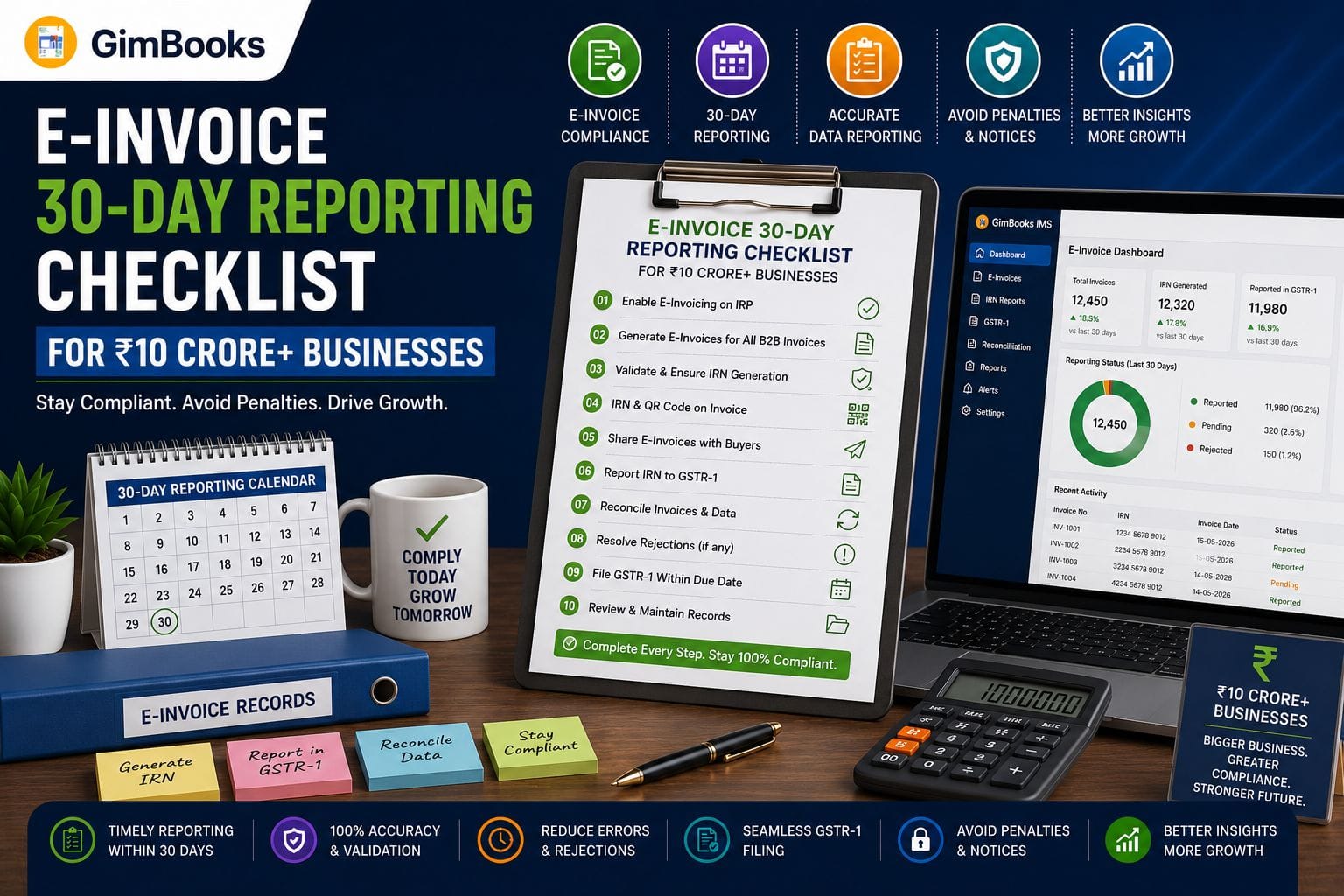
Businesses with an Annual Aggregate Turnover of ₹10 crore or more must report eligible e-invoice documents to an Invoice Registration Portal within 30 days of the document date.
The e invoice 30 day reporting rule has been effective since 1 April 2025. It applies to invoices, credit notes and debit notes for which an Invoice Reference Number must be generated.
Once the 30-day reporting window expires, the Invoice Registration Portal blocks IRN generation for the document. This can create GST compliance problems, delay customer payments and affect the buyer’s Input Tax Credit process.
This guide provides a practical e-invoice compliance checklist for finance teams, accountants, manufacturers, wholesalers, distributors and other businesses covered by the ₹10 crore reporting threshold.
Key Takeaways
- The 30-day e-invoice reporting rule applies to taxpayers with an AATO of ₹10 crore or more.
- The restriction has applied from 1 April 2025.
- It covers invoices, credit notes and debit notes requiring an IRN.
- The 30 days are calculated from the document date.
- The Invoice Registration Portal rejects documents reported after the permitted window.
- The general e-invoicing mandate starts at ₹5 crore AATO, but the 30-day restriction currently applies from ₹10 crore AATO.
- Businesses should generate IRNs on the same day instead of treating the 30th day as the normal reporting target.
- Daily reconciliation and automated alerts are essential for high-volume businesses.
What Is the E-Invoice 30-Day Reporting Rule?
The e invoice 30 day reporting rule requires covered taxpayers to submit eligible invoice data to an authorised Invoice Registration Portal within 30 days from the date shown on the document.
After validating the invoice data, the IRP generates:
- a unique Invoice Reference Number;
- a digitally signed e-invoice;
- a signed QR code;
- authenticated invoice data that can flow into the GST reporting system.
The rule does not mean that a business has 30 days to issue the invoice to the customer. The tax invoice must still be created according to the applicable GST time-of-supply and invoicing provisions.
The 30-day period is the maximum system window within which the already-created document can be reported for IRN generation.
For the official rule, refer to the GSTN advisory on the 30-day e-invoice reporting limit.
Who Must Follow the 30-Day E-Invoice Rule?
The reporting restriction applies where the taxpayer’s Annual Aggregate Turnover is ₹10 crore or more.
AATO is considered across GST registrations operating under the same PAN rather than separately for each branch or GSTIN.
A business should check:
- turnover across all GSTINs under the PAN;
- turnover in the relevant previous financial years;
- whether it is already enabled for e-invoicing;
- whether its business category is covered or exempt;
- whether the transaction requires an e-invoice.
Businesses can verify their status through the government’s e-invoice enablement checker.
Difference Between the ₹5 Crore and ₹10 Crore Thresholds
These two thresholds serve different purposes and should not be confused.
Read the detailed guide on the ₹5 crore e-invoice turnover rule to determine whether general e-invoicing applies to your business.
Which Documents Are Covered?
The 30-day reporting restriction applies to all document types for which an IRN must be generated, including:
- B2B tax invoices;
- export invoices;
- debit notes;
- credit notes;
- specified supplies to government departments or registered entities;
- other notified documents covered by e-invoicing.
The rule generally does not apply to ordinary B2C invoices because an IRN is not generated for standard B2C supplies under the current e-invoicing framework.
Businesses must also consider sector-specific exemptions. Certain notified entities and supplies may be outside the e-invoicing mandate even if their turnover exceeds the threshold.
How Is the 30-Day E-Invoice Time Limit Calculated?
The reporting window is calculated from the date shown on the invoice, debit note or credit note.
Official Example
If an invoice is dated 1 April, it must be reported on or before 30 April.
From 1 May onward, the IRP will not accept that invoice for IRN generation.
The count is based on calendar days, not only working days. Saturdays, Sundays and public holidays should therefore be considered when planning the reporting workflow.
Businesses should not wait until the last day. Same-day or next-day IRN generation is safer and reduces the risk of portal downtime, employee absence, validation errors or missing approvals.
Infographic: The 30-Day IRN Compliance Clock
Recommended infographic placement: After the section explaining how the deadline is calculated.
E-Invoice 30-Day Reporting Workflow
DAY 0Create the invoice, debit note or credit note↓Validate GSTIN, invoice number, date, HSN/SAC, tax and place of supply↓
DAY 0–1: GREEN ZONEUpload document details to the IRPGenerate IRN and signed QR codeShare authenticated invoice with the customer↓
DAILY CONTROLCompare sales register with IRN-generated recordsIdentify invoices still awaiting IRN↓
DAY 21: YELLOW ALERTEscalate unresolved invoices to the finance managerResolve GSTIN, tax, approval and master-data errors↓
DAY 25: RED ALERTPrioritise immediate IRP reportingDo not wait for month-end closing↓
DAY 30: FINAL WINDOWComplete IRN generation before the reporting window closes↓
AFTER THE DEADLINEIRP rejects the old documentNo IRN or signed QR code is generatedCompliance and customer ITC risks arise
Suggested infographic title:30-Day E-Invoice Reporting Checklist for ₹10 Crore+ Businesses
Suggested image alt text:E-invoice 30-day reporting rule timeline for businesses with ₹10 crore turnover
E-Invoice 30-Day Reporting Checklist
Use the following checklist for every B2B invoice, export invoice, debit note or credit note that requires an IRN.
1. Confirm Whether the Transaction Requires an E-Invoice
Before reporting, verify:
- the supplier is covered by e-invoicing;
- the transaction is B2B, export or another covered supply;
- the recipient GSTIN is valid;
- the supplier is not covered by a notified exemption;
- the document type requires an IRN.
The official e-invoice FAQ section can be used for checking common applicability questions.
2. Validate the Invoice Date
The invoice date starts the 30-day clock.
Your billing software should prevent:
- accidental backdating;
- invoice dates from the wrong financial year;
- future-dated invoices;
- inconsistent dates between the invoice and accounting voucher;
- delayed submission caused by approval workflows.
The date in the ERP, invoice PDF and IRP JSON should match.
3. Verify Supplier and Buyer GSTINs
Incorrect GSTINs are a common reason for IRN rejection.
Check:
- supplier GSTIN;
- recipient GSTIN;
- legal name and trade name;
- state code;
- place of supply;
- registration status;
- whether the customer is registered or unregistered.
Do not wait until the end of the reporting window to correct customer master data.
4. Check Invoice Number Format
Invoice numbers should follow the permitted format and remain unique within the financial year.
Review:
- invoice number length;
- permitted characters;
- financial-year sequence;
- duplicate invoice numbers;
- branch-wise numbering;
- accidental spaces or unsupported special characters.
A duplicate document number under the same supplier GSTIN and financial year can cause IRN validation failure.
5. Verify HSN or SAC Details
Confirm that:
- the correct HSN or SAC code is used;
- the code matches the goods or services supplied;
- the required number of digits is entered;
- the GST rate matches the classification;
- cess details are included where applicable.
Incorrect classification can create both IRN errors and tax-computation problems.
6. Recheck Taxable Value and GST Calculation
Validate:
- quantity;
- unit price;
- discount;
- taxable value;
- CGST and SGST;
- IGST;
- cess;
- other charges;
- invoice total;
- rounding adjustments.
Automated GST calculation reduces the chance of manual errors, particularly for businesses processing hundreds of invoices every day.
7. Confirm Place of Supply and Tax Type
The place of supply determines whether CGST and SGST or IGST should be charged.
For every invoice, verify:
- supplier state;
- recipient state;
- place of supply;
- bill-to location;
- ship-to location;
- whether the transaction is intra-state or inter-state.
Bill-to/ship-to transactions need additional attention because the delivery location and recipient location may differ.
8. Submit the Document to the IRP
Invoice data can be reported through:
- direct API integration;
- GST Suvidha Provider integration;
- authorised IRP software;
- bulk JSON upload;
- compatible billing or accounting software.
GimBooks provides an e-invoicing solution that helps businesses generate and manage GST-compliant invoices through an organised billing workflow.
9. Confirm IRN and QR Code Generation
Do not treat the invoice as successfully reported merely because it was exported from the accounting system.
Confirm that the IRP has returned:
- valid IRN;
- acknowledgement number;
- acknowledgement date;
- digitally signed invoice data;
- signed QR code;
- successful response status.
Store the IRN against the original accounting voucher.
10. Share the Authenticated Invoice
The final customer-facing invoice should include the IRN-linked signed QR code and other applicable invoice particulars.
The sales or dispatch team should not send an unauthenticated invoice where e-invoicing is mandatory.
11. Reconcile the Sales Register Daily
Compare:
A daily reconciliation catches missing IRNs long before the 30-day limit expires.
12. Monitor Invoice Ageing
Maintain an ageing report with the following buckets:
Daily, Weekly and Monthly Compliance Controls
Daily Controls
- Generate IRNs for all eligible invoices.
- Review failed IRP requests.
- Compare invoices created with IRNs generated.
- Correct GSTIN and master-data errors.
- Check unreported debit and credit notes.
- Retain IRP acknowledgement data.
Weekly Controls
- Review invoice ageing.
- Escalate invoices older than seven days.
- Analyse recurring error codes.
- Confirm that branch and warehouse teams are reporting invoices.
- Review invoices created during portal downtime.
- Compare cancellation records with the books.
Monthly Controls
- Reconcile the sales register with IRP data.
- Compare e-invoice data with GSTR-1.
- Review unreported or rejected documents.
- Confirm that credit and debit notes have valid IRNs.
- Measure average time between invoice creation and IRN generation.
- Investigate invoices approaching the 30-day deadline.
- Document compliance exceptions and corrective action.
What Happens If the 30-Day Deadline Is Missed?
Once a covered document becomes older than the permitted reporting window, the IRP validation prevents IRN generation.
This can result in:
Invalid E-Invoice Documentation
Where e-invoicing is mandatory, an invoice issued without following the prescribed IRN process may not be treated as a valid tax invoice for GST purposes.
Buyer ITC Disruption
The customer may be unable to rely on the invoice for Input Tax Credit until the transaction is corrected through an appropriate and legally valid process.
Payment Delays
Many corporate buyers validate IRNs before approving supplier payments. Missing IRNs can therefore delay invoice acceptance and payment processing.
GSTR-1 Reconciliation Issues
An invoice that has not been properly reported through the e-invoice system may create mismatches between the sales register, IRP data and GSTR-1.
Penalty and Notice Exposure
Non-compliance with mandatory e-invoicing may create exposure to GST penalties, notices, audits and customer disputes.
Read more about the consequences of non-generation of an IRN.
Important: Do not casually issue a duplicate or backdated invoice after the IRP reporting window has expired. The correct treatment can depend on the transaction, return period and accounting records. Obtain advice from a qualified GST professional.
Common Reasons Businesses Miss the Deadline
Waiting Until Month-End
Some finance teams generate all IRNs during monthly GST closing. This approach is risky because invoices created early in the month may already be close to or beyond the deadline.
Delayed Customer GSTIN Confirmation
Sales teams sometimes create invoices before validating the buyer’s GST details. Subsequent corrections delay IRN generation.
Complex Approval Workflows
Invoices may remain pending with project, sales, legal or finance teams even after the document date has been assigned.
Disconnected Branch Systems
Branches may create invoices locally while the head office handles IRP reporting. Delayed data transfer can consume much of the reporting window.
Repeated Validation Errors
Incorrect HSN codes, tax values, state codes, invoice numbers or GSTINs can cause repeated IRP rejection.
Missing Credit and Debit Notes
Businesses often focus on sales invoices but overlook that the 30-day reporting restriction also applies to eligible credit and debit notes.
Portal or Integration Downtime
Technical failures can interrupt reporting. Businesses should maintain a pending-document log and retry promptly rather than waiting until the deadline.
Recommended Internal Workflow for ₹10 Crore+ Businesses
Assign clear ownership across departments.
The operational objective should be same-day IRN generation, even though the system permits reporting within 30 days.
What If an E-Invoice Needs Correction?
An e-invoice cannot be edited directly on the IRP after the IRN has been generated.
Where permitted, the IRN may be cancelled within 24 hours of generation. After that, corrections generally need to be handled through the appropriate GST return, credit note, debit note or accounting process.
Read the detailed guide on e-invoice cancellation vs amendment.
Businesses should maintain a separate process for:
- incorrect customer GSTIN;
- wrong taxable value;
- incorrect GST rate;
- cancelled supplies;
- returned goods;
- invoice duplication;
- changes identified after the 24-hour cancellation period.
How GimBooks Helps Businesses Maintain E-Invoice Compliance
GimBooks helps businesses organise invoice creation and GST billing from a central platform.
Its e-invoicing and billing capabilities can support:
- GST-compliant invoice creation;
- automated GST calculations;
- customer and item master records;
- digital invoice storage;
- e-invoice generation;
- e-way bill workflows;
- invoice history;
- inventory and transaction records;
- GST reports;
- access from mobile and desktop systems.
By maintaining invoice data in one system, businesses can reduce delays between invoice creation and IRN reporting.
A recommended process is:
Create invoice in GimBooks → validate GST details → generate e-invoice and IRN → share authenticated invoice → monitor records → reconcile before GSTR-1
See the step-by-step guide on creating e-invoices with GimBooks.
Final 30-Day E-Invoice Audit Checklist
Before closing each GST period, confirm:
- The business’s e-invoice applicability has been verified.
- AATO has been checked across all GSTINs under the PAN.
- Every eligible invoice has an IRN.
- Every eligible debit note has an IRN.
- Every eligible credit note has an IRN.
- No reportable document is older than 20 days without an IRN.
- Critical ageing alerts are generated from day 21 onward.
- Customer GSTINs have been validated.
- HSN/SAC and GST rates have been checked.
- Place-of-supply details are correct.
- IRP rejections have been resolved.
- IRN and acknowledgement data are stored in the accounts.
- Signed QR codes appear on final invoices.
- IRP data agrees with the sales register.
- E-invoice data is reconciled before GSTR-1 filing.
- Finance, sales and branch teams understand the 30-day deadline.
Frequently Asked Questions
What is the e invoice 30 day reporting rule?
The rule requires taxpayers with an Annual Aggregate Turnover of ₹10 crore or more to report invoices, credit notes and debit notes requiring an IRN within 30 days from the document date.
When did the 30-day e-invoice rule become effective?
The restriction became effective on 1 April 2025 for taxpayers with AATO of ₹10 crore or more.
Does the 30-day rule apply to ₹5 crore businesses?
The general e-invoicing mandate applies from the notified ₹5 crore threshold. However, the specific 30-day IRP reporting restriction currently applies to taxpayers with AATO of ₹10 crore or more.
Does the rule apply to credit notes and debit notes?
Yes. The GSTN advisory confirms that it applies to invoices, credit notes and debit notes for which an IRN must be generated.
What happens after the 30-day reporting period?
The IRP validation rejects the document and does not generate an IRN after the permitted reporting window.
Can the IRP deadline be extended because of a weekend or holiday?
The reporting window is based on calendar days. Businesses should complete IRN generation early rather than relying on the final day.
Can I backdate an invoice and generate the IRN later?
Businesses covered by the ₹10 crore threshold cannot report a document once it becomes older than the permitted 30-day window. Backdating also creates serious accounting and GST compliance risks.
Can an e-invoice be cancelled?
An IRN can generally be cancelled through the e-invoice system within 24 hours of generation, subject to applicable conditions. It cannot be edited directly after generation.
How can billing software help with the 30-day rule?
Billing software can centralise invoice data, automate tax calculations, reduce validation errors and help businesses generate and track IRNs promptly.
Should businesses wait for 30 days before reporting invoices?
No. The 30-day period is a maximum reporting window, not a recommended operating process. Same-day or next-day IRN generation is safer.
Conclusion
The e invoice 30 day reporting rule requires ₹10 crore+ businesses to move from delayed or month-end invoice reporting to a continuous compliance process.
The strongest control is not a last-day reminder. It is a same-day workflow that validates the document, generates the IRN, records the signed QR code and reconciles the transaction against the sales register.
Businesses should combine:
- accurate customer and item master data;
- automated GST calculations;
- daily IRN generation;
- invoice-ageing alerts;
- clear escalation ownership;
- regular IRP reconciliation;
- disciplined GSTR-1 review.
Using GimBooks e-invoicing software can help businesses organise GST invoices, reduce manual errors and maintain a more timely e-invoice workflow.
Start your free trial and simplify GST invoicing with GimBooks.