
How to Avoid Missing the 30-Day E-Invoice Reporting Window
For businesses covered under e-invoicing, invoice creation and IRN generation can no longer be treated as separate month-end activities. Once an invoice, credit note or debit note is created, the business must make sure it is reported to the Invoice Registration Portal within the allowed time.
From 1 April 2025, taxpayers with Aggregate Annual Turnover of ₹10 crore and above must report applicable e-invoices within 30 days. This applies to invoices, credit notes and debit notes for which IRN generation is required. If the document is reported beyond the allowed window, the IRP can restrict IRN generation.
For businesses that create invoices daily, manage multiple GSTINs, issue credit notes later or depend on month-end bulk uploads, this rule makes invoice date control extremely important. A missed e-invoice reporting deadline can delay billing, create GST return mismatches and affect customer reconciliation.
This guide explains how to avoid missing the 30-day e-invoice reporting window with practical controls for finance teams, accountants and business owners.
What Is the 30-Day E-Invoice Reporting Window?
The 30-day e-invoice reporting window means that eligible taxpayers must report the document to the IRP within 30 days from the document date. For example, if an invoice is dated 1 April 2025, it should be reported on or before 30 April 2025. The same time-limit principle applies to credit notes and debit notes where IRN generation is applicable.
This is different from normal GST return filing. GSTR-1 may be filed monthly or quarterly depending on the business, but e-invoice reporting has to happen much earlier. Businesses should not wait until return filing to check whether IRNs have been generated.
For a broader compliance checklist, you can also refer to our guide on E-Invoice 30-Day Reporting Rule Checklist.
30-Day E-Invoice Reporting Rule Summary
Why Businesses Miss the 30-Day E-Invoice Reporting Deadline
Most businesses do not miss the 30-day e-invoice reporting deadline intentionally. They miss it because their billing process does not track invoice age properly.
Common reasons include:
- Invoices are created but not reported to the IRP immediately.
- Sales teams create backdated invoices after dispatch.
- Credit notes and debit notes are prepared later during reconciliation.
- Month-end bulk e-invoice generation is delayed.
- Invoices remain pending for internal approval.
- Branch teams send billing data late to the head office.
- IRP validation errors are not fixed quickly.
- Invoice data is maintained in Excel before being uploaded to the portal.
The biggest mistake is treating IRN generation as a later compliance task. For businesses covered under the 30-day rule, IRN generation should be part of the invoice creation workflow itself.
Common Reasons for Missing the 30-Day Window
1. Generate IRN on the Same Day as Invoice Creation
The safest way to avoid missing the 30-day e-invoice reporting window is to generate the IRN on the same day the invoice is created.
A risky workflow looks like this:
- Create invoice.
- Dispatch goods or share invoice copy.
- Wait for internal approval.
- Upload invoices in bulk at month-end.
- Fix errors after rejection.
This workflow creates a compliance gap because the invoice date keeps aging even when the IRN is pending.
A better workflow is:
- Create invoice.
- Validate GSTIN, HSN/SAC, tax rate and place of supply.
- Generate IRN.
- Share the final invoice with the customer.
- Use the same data for GST return preparation.
If your business is still uploading invoice data manually, using a connected e-invoicing software workflow can reduce the gap between invoice creation and IRN generation.
2. Track Invoice Age Daily
The 30-day limit depends on the document date, so every invoice should have an ageing status. Finance teams should not rely only on memory, manual follow-ups or month-end checks.
A simple invoice-age tracker can classify documents like this:
- 0–7 days: Safe zone
- 8–15 days: Follow-up zone
- 16–25 days: Warning zone
- 26–30 days: Urgent action zone
- Above 30 days: High-risk / reporting blocked
This ageing should apply to invoices, credit notes and debit notes. If a document is already more than 20 days old and IRN has not been generated, it should be treated as urgent.
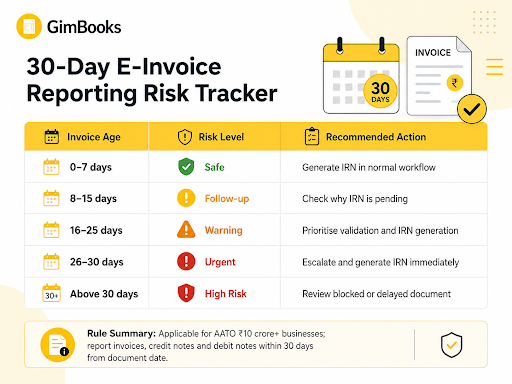
Invoice Age Tracking Table

3. Maintain a Pending IRN Report
A pending IRN report is one of the most useful controls for businesses covered under the 30-day rule. This report should show all documents where IRN is not generated yet.
The report should include:
- Branch or GSTIN
- Document type
- Invoice, credit note or debit note number
- Document date
- Customer name
- Customer GSTIN
- Taxable value
- GST amount
- Current invoice age
- IRN status
- Error reason, if rejected
The accounts team should check this report daily. Finance heads can review the same report weekly to identify branches, teams or document types where delays are common.
With GimBooks, businesses can manage GST invoices, billing records and e-invoice workflows in one system instead of depending only on scattered spreadsheets.
4. Do Not Depend Only on Month-End Bulk Uploads
Month-end bulk e-invoice generation may look convenient, but it increases risk when invoice volume is high.
For example, if invoices are dated in the first week of the month and the business waits until the next month-end to report them, some invoices may cross the 30-day window before they are uploaded.
Bulk generation should be used carefully. A safer approach is to run e-invoice reporting daily or every few days, especially for B2B invoices. Month-end should be used for reconciliation, not for first-time IRN generation.
For more details on handling bulk reporting safely, read our guide on Month-End Bulk E-Invoice Generation Without Missing the 30-Day Limit.
5. Fix IRP Validation Errors Immediately
Even if an invoice is uploaded within 30 days, IRN will not be generated if the data fails IRP validation.
Common validation issues include:
- Invalid GSTIN
- Wrong HSN or SAC
- Incorrect GST rate
- Tax calculation mismatch
- Duplicate invoice number
- Wrong place of supply
- Missing mandatory invoice fields
- Incorrect document date
Rejected e-invoices should not remain pending. If an invoice is already close to the 30-day window, even a small validation error can become a serious compliance issue.
Create an internal rule: any rejected e-invoice older than 20 days should be fixed on priority.
You can use our E-Invoice Error Codes and Fixes guide to understand common IRP errors and how to resolve them.
6. Control Backdated Invoices
Backdated invoices are a major reason businesses miss the 30-day e-invoice reporting window. Sometimes teams create invoices after dispatch, after customer approval or after service delivery. If the invoice date is old, the available reporting window becomes shorter.
Businesses should create strict invoice date controls:
- Do not allow backdated invoices without approval.
- Highlight invoices where the document date is more than 7 days old.
- Block very old invoice dates unless approved by finance.
- Generate IRN immediately for approved backdated invoices.
- Keep an audit trail for date changes.
Invoice date control is also important for avoiding duplicate document issues. For branch-wise invoice series and duplicate IRN prevention, refer to our Duplicate IRN Prevention Checklist for Multi-Branch Businesses.
7. Monitor Credit Notes and Debit Notes Separately
Many businesses track sales invoices carefully but ignore credit notes and debit notes until return filing or customer reconciliation.
This creates risk because the 30-day reporting restriction also applies to credit notes and debit notes where IRN generation is required.
Create separate tracking for:
- Sales invoices pending IRN
- Credit notes pending IRN
- Debit notes pending IRN
- Rejected documents
- Documents close to 30 days
Old credit notes discovered during GSTR-1 preparation can become difficult to handle if the reporting window has already passed.
8. Check Mandatory Invoice Fields Before IRN Generation
E-invoice rejection often starts with incomplete or incorrect invoice data. Before reporting the invoice to the IRP, the billing team should confirm that all mandatory details are correct.
Key fields to check include:
- Supplier GSTIN
- Buyer GSTIN
- Invoice number
- Invoice date
- HSN/SAC
- Taxable value
- GST rate
- CGST, SGST or IGST
- Place of supply
- Document type
- Ship-to details, where applicable
If your team wants a detailed field-level review, use the GST Invoice Mandatory Fields Audit Checklist.
9. Review Place of Supply Before Uploading
Wrong place of supply can lead to incorrect CGST, SGST or IGST treatment. This can cause invoice correction delays and IRP validation issues.
Before generating IRN, check whether the transaction is intrastate or interstate. For goods, verify the movement of goods, bill-to ship-to scenarios and delivery location. For services, verify the recipient location and applicable place-of-supply rule.
You can refer to these related guides:
Place of Supply Audit Checklist for Goods Invoices
Place of Supply Audit Checklist for Service Invoices
For bill-to ship-to transactions, also check our E-Invoice Bill-to Ship-to Data Entry Checklist.
10. Assign Branch-Wise Responsibility
Businesses with multiple branches, warehouses or GSTINs need branch-wise accountability. A central finance team can monitor the dashboard, but each branch should be responsible for timely invoice reporting.
Each branch should check:
- Invoices created but not reported
- Documents older than 15 days
- Credit notes and debit notes pending IRN
- Rejected e-invoices
- Customer GSTIN errors
- Place-of-supply mismatches
A branch-wise pending IRN report helps identify where delays are happening. This is especially useful for distributors, manufacturers and multi-location service businesses.
11. Reconcile Before GSTR-1 Filing
E-invoice data should be reconciled before GSTR-1 filing. The goal is to make sure the sales register, IRN data and GST return data are aligned.
A basic reconciliation should compare:
- Sales register
- IRN generated report
- Cancelled e-invoices
- Credit notes
- Debit notes
- GSTR-1 data
However, reconciliation should not be the first time the team checks pending IRNs. The 30-day window requires daily monitoring, not only return-period review.
12. Use GST Billing Software for Better E-Invoice Controls
Manual tracking becomes difficult when invoice volume increases. GST billing software can help businesses reduce delays by keeping billing, validation, reporting and records in one workflow.
With GimBooks, businesses can create GST invoices, manage customer records, track billing data and handle e-invoicing more systematically. This helps accounts teams reduce manual follow-ups and avoid missed reporting windows.
A connected billing system is especially useful when your business handles:
- Daily B2B invoices
- Multiple branches
- Credit notes and debit notes
- Bulk invoice generation
- Inventory-linked billing
- E-way bill workflows
- GST reports
Businesses can explore GimBooks GST billing software to manage billing, invoicing and GST records in a cleaner workflow.
Practical Checklist to Avoid Missing the 30-Day E-Invoice Reporting Window
Generate IRN on the same day as invoice creation wherever possible.
- Track invoice age from the document date.
- Create a daily pending IRN report.
- Do not depend only on month-end bulk uploads.
- Fix IRP validation errors immediately.
- Include credit notes and debit notes in the same tracking process.
- Control backdated invoice creation.
- Assign branch-wise responsibility for IRN generation.
- Review invoices older than 20 days as urgent.
- Check mandatory invoice fields before upload.
- Verify place of supply before reporting.
- Reconcile sales register, IRN data and GSTR-1 before filing.
Use GST billing software for better invoice date and IRN status control.
Conclusion
The 30-day e-invoice reporting window is not just a GST portal deadline. It is a billing process control. Businesses that create invoices first and report them later are more likely to miss the IRN generation time limit.
To avoid missing the 30-day e-invoice reporting window, businesses should generate IRNs early, track invoice age daily, fix rejected invoices quickly, monitor credit notes and debit notes, control backdated invoices and use GST billing software that supports structured e-invoicing workflows.
For ₹10 crore+ businesses, the best approach is simple: do not treat e-invoicing as a month-end compliance task. Build it directly into the invoice creation process.
FAQs
What is the 30-day e-invoice reporting window?
The 30-day e-invoice reporting window is the time limit within which eligible taxpayers must report applicable invoices, credit notes and debit notes to the IRP for IRN generation.
Who needs to follow the 30-day e-invoice reporting rule?
The rule applies to taxpayers with Aggregate Annual Turnover of ₹10 crore and above, where e-invoicing and IRN generation are applicable.
Does the 30-day rule apply to credit notes and debit notes?
Yes. The restriction applies to invoices, credit notes and debit notes for which IRN generation is required.
What happens if the 30-day e-invoice reporting window is missed?
If a covered taxpayer reports an applicable document beyond the allowed 30-day window, the IRP may restrict IRN generation for that document.
How can businesses avoid missing the e-invoice reporting deadline?
Businesses can avoid missing the deadline by generating IRN on the same day, tracking pending IRNs daily, fixing validation errors quickly, controlling backdated invoices and using GST billing software with e-invoice tracking.