How to Generate a Consolidated E-Way Bill for Multiple Consignments
A consolidated e-way bill is used when multiple consignments are being transported in a single vehicle or conveyance. Instead of carrying only separate e-way bill documents for each consignment, the transporter can generate one consolidated e-way bill in FORM GST EWB-02 by linking the individual e-way bill numbers.
This is especially useful for transporters, distributors, wholesalers, dispatch teams and logistics operators handling several shipments in one vehicle.
For example, if one truck carries goods for five different customers and each consignment already has its own e-way bill, the transporter can generate one consolidated e-way bill for that vehicle movement.
Quick answer: To generate a consolidated e-way bill, first generate individual e-way bills for each consignment. Then log in to the e-way bill portal, go to Consolidated EWB → Generate New, enter the transport mode, vehicle details and individual e-way bill numbers, add all consignments and submit to generate FORM GST EWB-02.
Key Takeaways
- A consolidated e-way bill is generated in FORM GST EWB-02.
- It is used when multiple consignments are transported in one vehicle or conveyance.
- Each consignment must already have its own valid individual e-way bill in FORM GST EWB-01.
- The consolidated e-way bill does not replace the individual e-way bills.
- It works like a trip sheet for the vehicle.
- It does not have a separate independent validity period.
- Each consignment must reach its destination within the validity period of its individual e-way bill.
- A transporter can generate consolidated e-way bills for multiple consignments in one vehicle.
- Vehicle-number changes can be handled through the Regenerate CEWB option.
- Businesses using billing software should maintain accurate invoice, transport and e-way bill records before consolidation.
What Is a Consolidated E-Way Bill?
A consolidated e-way bill is a single transport-level document that lists multiple individual e-way bills being carried in one vehicle.
It is useful when a transporter carries several consignments in the same truck, van, lorry or other conveyance.
The consolidated document contains:
- consolidated e-way bill number;
- vehicle number;
- mode of transport;
- place from where the vehicle starts;
- individual e-way bill numbers;
- consignment details linked from the individual e-way bills.
The legal form used for this purpose is FORM GST EWB-02.
Consolidated E-Way Bill vs Individual E-Way Bill
A consolidated e-way bill is not a substitute for the original e-way bills. It is only a consolidated movement document for easier vehicle-level compliance.
When Is a Consolidated E-Way Bill Required?
A consolidated e-way bill is useful when:
- one vehicle carries multiple consignments;
- a transporter carries goods of different consignors in one vehicle;
- a distributor sends multiple customer orders in one trip;
- several e-way bills are assigned to the same transporter;
- a logistics team wants one vehicle-level document;
- a dispatch team wants to reduce document-handling complexity.
Example
A transporter is carrying five consignments in one truck:
Each consignment already has its own e-way bill. The transporter can generate one consolidated e-way bill by adding all five e-way bill numbers to FORM GST EWB-02.
Who Can Generate a Consolidated E-Way Bill?
A transporter can generate a consolidated e-way bill for movement of multiple consignments in one vehicle.
The transporter may be:
- a registered transporter;
- an enrolled transporter;
- a transporter handling consignments assigned by suppliers or recipients;
- a logistics operator moving goods for multiple customers.
The official e-way bill FAQ states that consignors, consignees and transporters can generate e-way bills. An unregistered transporter must enrol on the e-way bill portal before generating e-way bills for clients.
Pre-Requisites Before Generating a Consolidated E-Way Bill
Before generating FORM GST EWB-02, confirm the following:
- individual e-way bill has been generated for each consignment;
- each e-way bill number is valid;
- all consignments are actually being moved in the same vehicle;
- vehicle number is available;
- transport mode is known;
- the vehicle starting location is confirmed;
- the transporter is authorised or assigned to handle the movement;
- individual e-way bills are not expired;
- invoice, challan or supply documents match the e-way bill records;
- goods loaded in the vehicle match the included e-way bills.
A consolidated e-way bill should not be created only from planned dispatch data. It should reflect the consignments actually loaded in the vehicle.
Step-by-Step Process to Generate a Consolidated E-Way Bill
Step 1: Generate Individual E-Way Bills First
Each consignment must first have a separate individual e-way bill in FORM GST EWB-01.
The individual e-way bill should contain:
- invoice or document number;
- invoice date;
- supplier GSTIN;
- recipient GSTIN;
- item details;
- HSN code;
- taxable value;
- GST amount;
- transport details;
- delivery location;
- vehicle or transporter details, where applicable.
If the individual e-way bill is not generated, it cannot be included in a consolidated e-way bill.
For invoice-linked e-way bill automation, read How Billing Software Automatically Generates E-Way Bills.
Step 2: Log In to the E-Way Bill Portal
Go to the official e-way bill portal and log in with the transporter or authorised user credentials.
Use only the official e-way bill portal or a connected authorised software workflow.
Step 3: Open Consolidated EWB
From the main menu, go to:
Consolidated EWB → Generate New
This option is used to generate a new consolidated e-way bill for multiple consignments in one vehicle.
Step 4: Select Transport Mode
Choose the correct mode of transportation:
- Road
- Rail
- Air
- Ship
Most consolidated e-way bill use cases for distributors and transporters involve road transport, but the correct mode should be selected based on the actual movement.
Step 5: Enter Vehicle Starting Details
Enter:
- From State
- Vehicle Starts From
- Vehicle Number
These details should match the actual movement plan.
For road transport, the vehicle number is especially important. Incorrect vehicle details can create compliance problems during transit.
Step 6: Enter Individual E-Way Bill Numbers
Enter the e-way bill number of the first consignment.
Once the number is entered, the portal auto-populates the relevant details from the individual e-way bill.
Then add the next e-way bill number.
Repeat the process until all consignments in the vehicle have been added.
Step 7: Review All Consignments
Before submitting, check:
- all individual e-way bill numbers are added;
- no wrong consignment is included;
- no consignment loaded in the vehicle is missing;
- vehicle number is correct;
- starting location is correct;
- individual EWBs are active;
- the delivery route is practical for included consignments.
Step 8: Submit and Generate FORM GST EWB-02
After verifying all entries, submit the form.
The system generates a consolidated e-way bill number.
The transporter should keep the consolidated e-way bill available during movement, along with access to the individual e-way bills.
Data Required for Consolidated E-Way Bill
Consolidated E-Way Bill Checklist Before Dispatch
Individual E-Way Bills
- Individual e-way bill generated for every consignment
- EWB number copied correctly
- Individual EWB is active
- Validity period checked
- Consignment details match invoice or challan
- Goods are actually loaded in the same vehicle
Vehicle and Transport
- Transport mode selected correctly
- Vehicle number verified
- Vehicle starting location confirmed
- From State selected correctly
- Driver or transporter has document access
- Route and delivery sequence reviewed
Consolidated EWB
- All relevant EWB numbers added
- Wrong consignments removed
- Multiple destination consignments checked
- Consolidated EWB generated before movement
- Consolidated EWB number saved
- Copy shared with transporter or vehicle in-charge
Reconciliation
- Consolidated EWB mapped to vehicle/trip
- Individual EWBs mapped to invoices
- Dispatch register updated
- Delivery status tracked
- Exceptions recorded
Can One Consolidated E-Way Bill Include Multiple Destinations?
Yes. A consolidated e-way bill may include e-way bills for goods going to multiple destinations, provided those consignments are being carried in the same vehicle.
For example:
- 3 consignments may be delivered to Pune;
- 4 consignments may be delivered to Nashik;
- 5 consignments may be delivered to Mumbai.
The transporter may generate one consolidated e-way bill if all these consignments are loaded in one vehicle.
Alternatively, separate consolidated e-way bills may be generated for different destination groups if operationally more practical.
Does a Consolidated E-Way Bill Have Its Own Validity?
No. A consolidated e-way bill works like a trip sheet. It contains details of different individual e-way bills, and those individual e-way bills may have different validity periods.
Each consignment must reach its destination within the validity period of its own individual e-way bill.
This is important because one consolidated e-way bill does not extend the life of an expiring individual e-way bill.
What If the Vehicle Number Changes?
If the vehicle number needs to be changed for a consolidated e-way bill, use the Regenerate CEWB option under the Consolidated EWB menu.
This option allows the user to change the vehicle number for the existing consolidated movement without changing the individual e-way bills.
After regeneration:
- a new consolidated e-way bill is generated;
- the new CEWB should be carried with the new vehicle;
- the old consolidated e-way bill becomes invalid for use.
Consolidated E-Way Bill vs Multi-Vehicle Option
Do not confuse a consolidated e-way bill with the multi-vehicle option.
If one vehicle carries several consignments, use consolidated EWB.
If one consignment moves in several vehicles, review the multi-vehicle option.
Common Mistakes While Generating Consolidated E-Way Bills
1. Trying to Generate EWB-02 Before Individual EWB-01
A consolidated e-way bill can be generated only after individual e-way bills exist.
Fix: Generate EWB-01 for each consignment first.
2. Including Expired or Cancelled E-Way Bills
A consolidated document does not make an invalid individual e-way bill valid.
Fix: Check status and validity before consolidation.
3. Entering the Wrong Vehicle Number
Vehicle mismatch can create transit risk.
Fix: Verify the number from the transport assignment or driver before submission.
4. Missing One Consignment
If a loaded consignment is not included, the transporter may still need to produce the individual EWB separately.
Fix: Match loading sheet, invoice list and EWB list before dispatch.
5. Including a Consignment Not Loaded in the Vehicle
The consolidated e-way bill should match the actual goods carried.
Fix: Consolidate only after the loading plan is final.
6. Assuming EWB-02 Extends Validity
The individual e-way bill validity still controls the consignment.
Fix: Check validity of each EWB, especially for long-distance trips.
7. Not Regenerating CEWB After Vehicle Change
A changed vehicle number must be reflected through the proper portal option.
Fix: Use Regenerate CEWB when vehicle changes.
8. Mixing Consolidated EWB and Multi-Vehicle Movement
These are different workflows.
Fix: Use consolidated EWB for multiple consignments in one vehicle; use multi-vehicle option for one consignment split across vehicles.
Practical Example: Distributor Sending Multiple Orders
A distributor in Ahmedabad sends goods to three customers in Surat using one truck.
The dispatch team first generates three individual e-way bills.
The transporter then generates one consolidated e-way bill by entering:
- transport mode: road;
- from state: Gujarat;
- vehicle starts from: Ahmedabad warehouse;
- vehicle number;
- EWB numbers: 1810XXXX001, 1810XXXX002 and 1810XXXX003.
The truck carries one consolidated e-way bill along with access to the individual e-way bills for each consignment.
Process Flow for Consolidated E-Way Bill
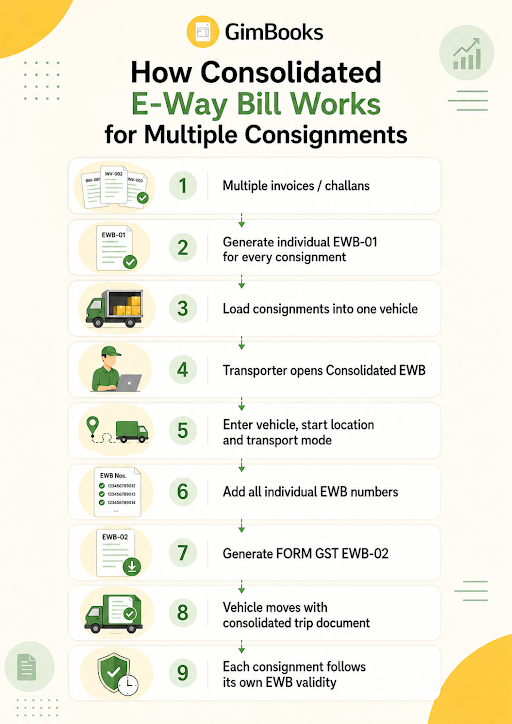
Invoice or delivery challan created↓Individual e-way bill generated for each consignment↓Consignments loaded in one vehicle↓Transporter opens Consolidated EWB → Generate New↓Transport mode, from state and vehicle details entered↓Individual e-way bill numbers added↓FORM GST EWB-02 generated↓Vehicle moves with consolidated e-way bill↓Deliveries completed as per individual EWB validity
How GimBooks Helps With E-Way Bill Workflows
GimBooks helps businesses create GST invoices, manage billing data and generate e-way bills from structured business records.
For dispatch and logistics teams, GimBooks can support:
- GST invoice creation;
- e-way bill generation;
- invoice and delivery document records;
- customer and supplier details;
- item and HSN information;
- purchase bill workflows;
- inventory visibility;
- mobile and web access;
- document tracking and reporting.
Businesses using GimBooks can reduce repeated manual data entry because invoice, party and item data are already maintained in the system.
A practical workflow is:
Create invoice in GimBooks → generate individual e-way bills → share details with transporter → consolidate multiple EWBs for one vehicle on the portal → track dispatch records
Explore the GimBooks e-way bill software for invoice-linked e-way bill workflows.
For businesses creating frequent invoices, also review:
- GST billing software
- How billing software automatically generates e-way bills
- GST invoice mandatory fields checklist
- E-Invoice Bill-to Ship-to Data Entry Checklist
- Purchase bill management
Official External References
Use official sources to verify the latest e-way bill requirements:
- Rule 138 of the CGST Rules
- E-Way Bill System FAQs
- Generating Consolidated E-Way Bill User Guide
- FORM GST EWB-02
- E-Way Bill Portal
Frequently Asked Questions
What is a consolidated e-way bill?
A consolidated e-way bill is FORM GST EWB-02. It lists multiple individual e-way bills for consignments being transported together in one vehicle.
When should I generate a consolidated e-way bill?
Generate it when multiple consignments, each having its own e-way bill, are being carried in the same vehicle or conveyance.
Is an individual e-way bill required before generating a consolidated e-way bill?
Yes. Every consignment must already have its own individual e-way bill before it can be added to a consolidated e-way bill.
Who can generate a consolidated e-way bill?
A transporter can generate a consolidated e-way bill for movement of multiple consignments in one vehicle.
Can a consolidated e-way bill include multiple destinations?
Yes. It can include consignments going to multiple destinations, provided they are being carried in the same vehicle.
Does a consolidated e-way bill have its own validity?
No. It works like a trip sheet. Each individual e-way bill included in the consolidated document keeps its own validity period.
Can the vehicle number be changed after generating a consolidated e-way bill?
Yes. Use the Regenerate CEWB option to update the vehicle number. A new CEWB is generated and the old CEWB becomes invalid for use.
Can a consolidated e-way bill replace individual e-way bills?
No. It does not replace the individual e-way bills. It only consolidates them into one vehicle-level document.
Can consolidated e-way bills be generated in bulk?
Yes. The e-way bill system supports bulk-generation facilities, including generation of consolidated e-way bills, through the prescribed JSON or tool-based process.
What is the difference between consolidated e-way bill and multi-vehicle option?
A consolidated e-way bill is for multiple consignments in one vehicle. The multi-vehicle option is for one consignment that is split across multiple vehicles, usually after transshipment.
Conclusion
A consolidated e-way bill makes transport documentation easier when one vehicle carries multiple consignments. It helps the transporter carry one vehicle-level trip sheet while still preserving the individual e-way bills for every consignment.
The key rule is simple: generate individual e-way bills first, then consolidate them in FORM GST EWB-02 before movement.
Dispatch teams should verify vehicle number, starting location, EWB validity and loaded consignments before generating the consolidated document.
Using GimBooks e-way bill software can help businesses manage invoice-linked e-way bill records, reduce repeated data entry and improve dispatch documentation.
Create accurate invoices, generate e-way bills and manage dispatch records more efficiently with GimBooks.