Maintain a Ledger Book for a Small Business
Learn how to maintain a ledger book for your small business with this step-by-step guide. Find different types of ledgers; avoid common bookkeeping mistakes with digital GST billing software like GimBooks, which simplifies ledger management and outstanding payment tracking.


Step-by-Step Ledger Guide for MSMEs
A ledger book helps you track customer balances, supplier payments, outstanding invoices, and overall business transactions.
Many small businesses still maintain ledgers manually in registers or spreadsheets, which can lead to calculation errors, missing entries, and difficulty tracking pending payments.
Using GST billing software with ledger management makes the process much easier. In this guide, you’ll learn how to create a ledger account in GST billing software and why digital ledgers are better than manual bookkeeping.
Common types of ledger accounts include:
- Customer Ledger (Debtors) – Tracks money customers owe you.
- Supplier Ledger (Creditors) – Tracks money you owe suppliers.
- Sales Ledger – Records sales transactions.
- Purchase Ledger – Records purchase transactions.
- Cash/Bank Ledger – Tracks cash and bank movements.
Why Create Ledger Accounts in GST Billing Software?
Benefits of maintaining a digital ledger include:
Manual Ledger | GST Billing Software |
|---|---|
Handwritten entries | Automatic transaction recording |
Calculation errors | Auto calculations |
Difficult to track dues | Real-time outstanding tracking |
No reminders | Automated payment reminders |
Hard to generate reports | Instant ledger reports |
Risk of data loss | Cloud backup |
How to Maintain a Ledger Account in GST Billing Software
Step-by-step guide to maintain ledger account in GimBooks.
Step 1: Open the Ledger
Go to GST billing software dashboard/App home screen and open the section for Customers/Debtor, Suppliers/ Vendor / Creditor, and Income and Expense account.
Most software provides separate options for customer and supplier ledgers.
Step 2: Click “Add New Party Account”
Select Add Ledger or Create New Party.
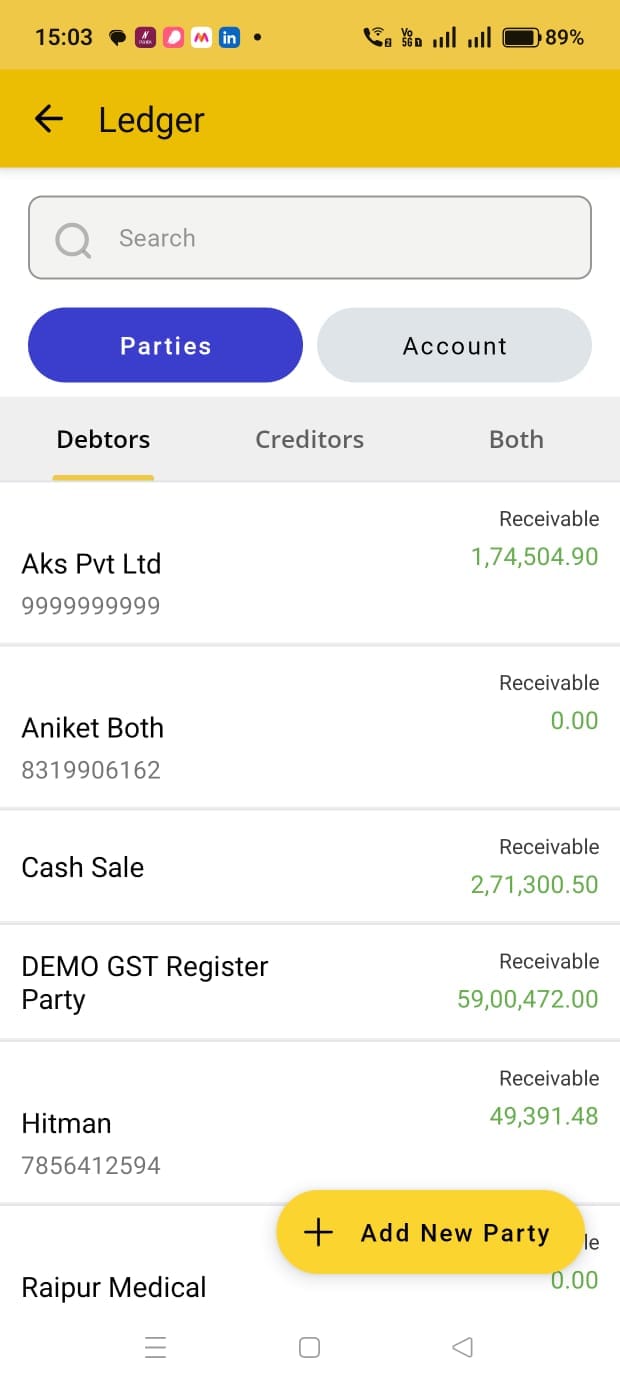
You’ll usually be asked to enter:
- Ledger Name
- Customer/Supplier Name
- Mobile Number
- GSTIN (if applicable)
- Address
- Opening Balance
- Ledger Type (Customer or Supplier)
Step 3: Enter Opening Balance
If the party already has a pending balance, enter the opening balance.
Example:
Customer:
ABC Traders
Opening Balance:
₹25,000
Type:
Receivable
This means the customer owes your business ₹25,000.
Step 4: Save the Ledger
Click Save.
The ledger account is now ready to use for invoices, payments, and reports.
Create a New Ledger Account in 2 Steps
Step 1: Click on add bank or cash account
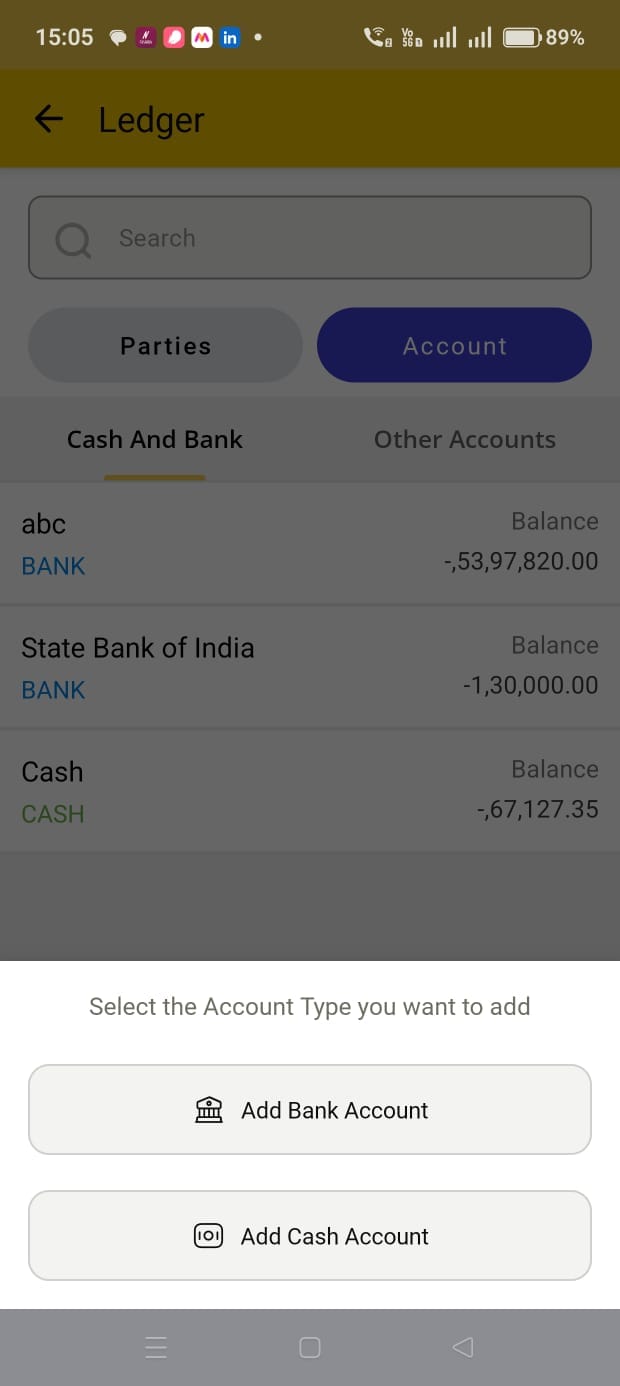
Step 2: Now add cash and bank account or income and expense account.
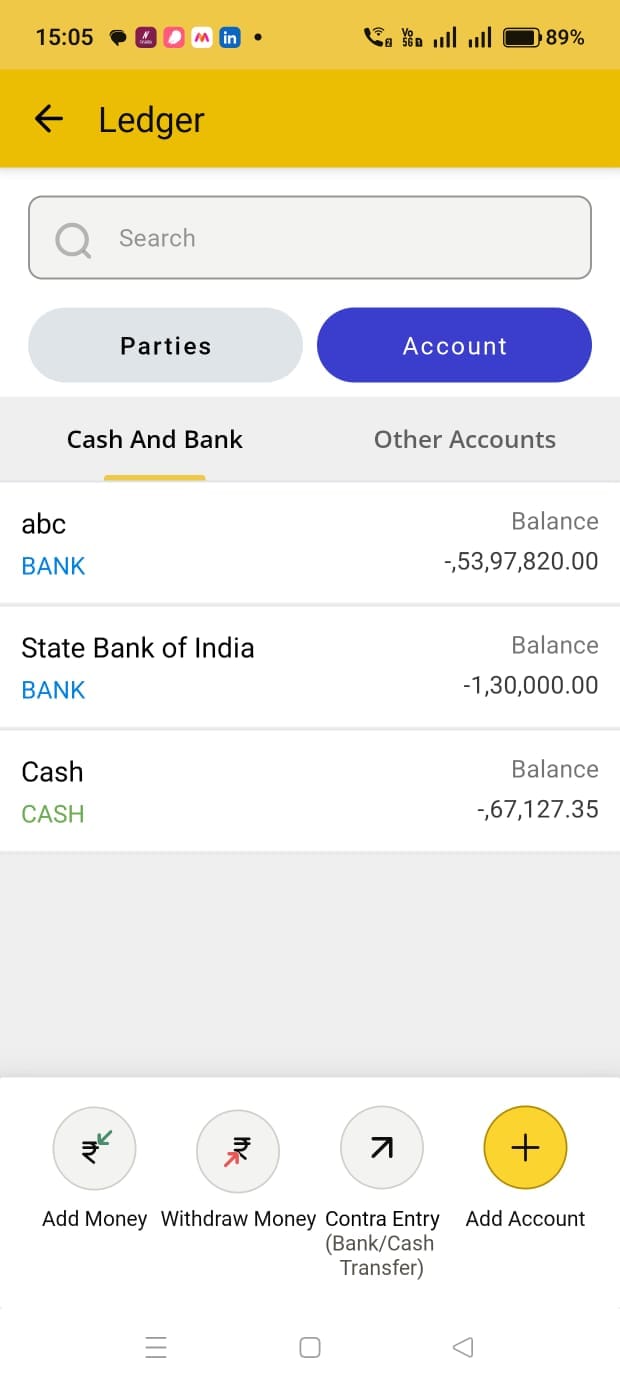
How Ledger Accounts Work Automatically
Once a ledger is created:
- Sales Invoice → Customer Ledger updates automatically.
- Purchase Bill → Supplier Ledger updates automatically.
- Payment Receipt → Outstanding amount reduces automatically.
- Payment Made → Supplier balance updates automatically.
This eliminates manual bookkeeping work.
Read more: Affordable Bookkeeping Software for Small Business to Maintain Ledger Accounts.
Example: Customer Ledger Entry
| Customer Ledger: ABC Traders (Receivable) | Debit (Dr) | Credit (Cr) |
|---|---|---|
| Opening Balance | ₹25,000 | — |
| Sales Invoice | ₹10,000 | — |
| Payment Received | — | ₹8,000 |
| Outstanding Balance | ₹27,000 | — |
How GimBooks Helps Create and Manage Ledgers
GimBooks simplifies digital bookkeeping by automatically maintaining customer and supplier ledgers.
With GimBooks, you can:
- Create customer and supplier ledgers in minutes.
- Add opening balances.
- Track outstanding payments.
- Record payment receipts.
- View complete transaction history.
- Send automated payment reminders.
- Generate ledger reports instantly.
- Access ledgers from mobile, web, and desktop.
- Keep all data synced in the cloud.
Best Practices for Ledger Management
- Record transactions daily.
- Verify GSTIN details before creating parties.
- Update payment receipts immediately.
- Review outstanding ledgers weekly.
- Use automated reminders for overdue payments.
- Reconcile customer balances regularly.
Conclusion
Creating ledger accounts in GST billing software is an easy ways to improve bookkeeping accuracy and track business finances effectively. Instead of maintaining manual khata books or spreadsheets, businesses can automate ledger management, monitor outstanding payments, and generate ledger reports instantly.
With GimBooks, customer and supplier ledgers are updated automatically whenever you create invoices, record payments, or manage purchases. This helps small businesses save time, reduce errors, and maintain better control over cash flow and outstanding collections.
FAQ on Ledger in GST Billing Software
What is a ledger account in GST billing software?
A ledger account records all transactions related to a customer, supplier, income, expense, or other business account.
How do I create a customer ledger?
Go to the Customers or Parties section, click Add New Ledger, enter customer details and opening balance, then save.
Can GST billing software track outstanding payments?
Yes, GST billing software automatically tracks pending invoices and customer balances.
Is digital ledger better than manual ledger?
Yes, maintaining digital ledgers reduce errors, save time, provide real-time reports, and support automated payment reminders.
Does GimBooks support customer and supplier ledgers?
Yes. GimBooks allows businesses to create and manage customer and supplier ledgers with automatic transaction updates.